Elyse DATABASE DOCUMENTATION
PURPOSE
The purpose of this manual is as a reference for application layer developers interfacing with the Elyse database. It is not intended for end users. The manual explains the general structure and functioning of the Elyse database.
Associated with this manual is a spreadsheet listing the details of all of the stored procedures: ElyseTablesAndStoredProcedures.xlsx. This is essentially the API reference for the database. This spreadsheet should be referred to in order to understand the input parameters and output data of specific stored procedures and what authentication is applied.
For more precise reference detail, the database schema and stored procedure code is freely available. AI tools can be used to interrogate the code and answer questions not covered in this documentation.
DESIGN PHILOSOPHY
Elyse is a document management system built around the following key concepts.
- Data is managed using a relational database structure customized for the purpose of a controlled document management system.
- Database integrity and security are given priority over other competing considerations.
- The system structure inherently facilitates enforcement of controlled document management system quality principles, such as for example ensuring that all document IDs are unique.
- The database structure permits a flexible end user application approach and seeks to avoid, wherever possible, attempting to second-guess how the user may wish to set up data fields. Hence, for example, the database does not have a hard-coded document title field but instead allows the user to create any number of named free text fields.
- Wherever possible, essential business rules are embedded into the database schema and stored procedures.
- The system follows an encapsulation approach whereby the database is independent of the application layer.
The database schema and stored procedures and functions code follow established, industry-standard SQL database design principles and coding practices familiar to any experienced database developer. The implementation does not employ novel or unconventional techniques; rather the value lies in how these standard methods are applied to the specific business rules and processes that together form the product.
SYSTEM INVARIANTS
Elyse is designed around a number of properties that describe the underlying behavior expected of a controlled document management system.
| Fundamental property | What must remain true |
|---|---|
| Document identity | Every controlled document has its own organization-defined identity, independent of any file. The identity is unique, can be used to find the document directly, and can represent existing identifiers exactly as they appear on the documents. |
| Document releases | A document's releases are distinct from the files used to represent them. A release can have multiple associated files and can retain the organization's existing release or revision identifier. |
| Controlled state | A release represents a fixed, controlled state. Once issued, its files and contents cannot be changed. There can be no more than one authoritative release of a document at any time. |
| Safe document retrieval | Searching for a document by its ID always leads an ordinary user to the authoritative release. Obsolete releases must not be inadvertently presented or retrieved as the current document, including through stale links. |
| Controlled transitions | When one release replaces another, the system must not expose an intermediate state in which both releases appear authoritative. The change must be effectively immediate from the user's perspective. |
| Historical reconstruction | The system must preserve enough information to establish which release was authoritative at any point in the past and to retrieve the exact files that constituted that release. |
| Migration without degradation | Existing document identities, release identifiers, historical states, and file associations can be brought into the system without changing their established meaning or forcing them through workflows that do not reflect their existing controlled state. |
SYSTEM CONTEXT
The Elyse database is highly encapsulated and operates on a zero-trust relationship with the application layer. A key feature of the Elyse security model is that the application layer only has permission to execute parameterized stored procedures. The database layer contains almost all critical business logic. This includes data validation, error handling, data manipulation, authentication and access control. The application layer has no responsibility for user authentication or access control. The only security responsibility held by the application layer is to ensure that security context leakage does not occur.
The application layer has no direct access to tables. Hence if a particular function is not available via an application-exposed stored procedure then that function cannot be performed. Apart from the requirement that the database must be running in a Windows environment, the database is application layer agnostic. The application is merely a user interface that can only perform functions that the connected user has been granted permission within the database to perform.
The following indicates the context of the Elyse database.
APPLICATION LAYER
Frontend
Backend
DATABASE LAYER
Application Roles
Stored Procedures and Functions
Application-exposed stored procedures
Internal stored procedures and functions
Ownership Chaining
Tables
FILESTREAM Container
Note that the ownership chain role is only used internally within the database. There is no need for the password for this role to be known to any application or any person and hence a copy of it should not be stored.
Note that the account that the application backend layer runs under should never be onboarded into the database access control list.
HIGH LEVEL DATA MODEL
The Elyse database is structured specifically for the purpose of managing controlled documents. The database is constructed around two primary entities: documents and files. Documents are abstract entities which serve the purpose of facilitating relationships between files. Files are the actual 'physical' content. The document to file relationship is a parent-child type relationship. Document IDs are not metadata of files. Files are related to document IDs. A document can be linked to zero or many files. A file can be linked to zero or many documents.
The database is designed to mirror the real-world structure of controlled document management. The separation of documents and files into separate entities allows for a relational structure to be created whereby the metadata associated with a document can be managed separately from the metadata associated with each release of the document. For example, the document has a document ID and a title while the release has a release number and date of issue. The release number and date of issue are linked to the file and will change with each release whereas the document ID and title generally should not. Typically, the file released for distribution will be in pdf format whereas the source file will be in a different format such as doc or dwg. Both files must be linked to the same document number and also have a metadata field that relates the two to the same release.
There are various practical ramifications of a database structure that mirrors the real-world needs of controlled document management. For example, since the document IDs are treated as an abstract entity separate from files, document identifiers can be created and reserved without needing to supply a blank or dummy file. Document IDs are stored in a single column in a table with a unique constraint applied to that column. Therefore at a very low level the database inherently enforces the rule that each document identifier must be unique. In Elyse the document identifiers that are stored within the database as the primary keys comprise the same string that the end user sees. There is no parallel or proxy document ID system hidden from the user.
In Elyse, document IDs are restricted to 50 characters but are otherwise unconstrained. There are no prohibited characters or mandatory formats. Document IDs, along with all other data, are handled via fully parameterized stored procedures, which manages the risk of SQL injection attack. Note that document IDs are not case sensitive. e.g aBc = AbC.
FILE STORAGE
Files are stored by Elyse in a FILESTREAM container. FILESTREAM containers are files which are under the full control of the database engine and are essentially part of the database schema. This means that transactional integrity and referential integrity are guaranteed by the database engine alone. This approach also ensures the security and immutability of files. Since there are no stored procedures which modify files it is not possible for unauthorized or undetected modifications of a file to occur after the file has been loaded into the database. While Elyse does provide the database infrastructure for workflow management, all collaborative file editing and fine-grained tracking of edits must be carried out using applications outside of the database. The file containing the detailed commenting and edit history for a particular release can then be stored in the database as an unchangeable historical record.
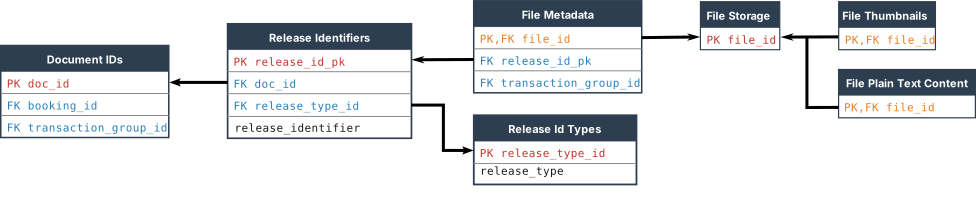
Noting that files are an entity separate from document IDs, files are not inherently required to be uniquely identified – unlike document IDs. Yet the database must maintain a human-friendly method of uniquely identifying each file. Hence each file is uniquely identified by an integer sequence number. When a file is stored, the application can supply an associated filename. When the file is returned it will be given the same filename that was supplied. If a filename was not supplied when the file was stored then a filename will be created using the sequence number ID. Filenames are not used for any other purpose such as storing metadata or uniquely identifying files.
METADATA
Metadata is used for two purposes:
- User searching, sorting, filtering and grouping and
- Access control.
Metadata structures can be divided into the following broad groupings.
- Metadata which is linked exclusively to documents. This is the
doc_attrschema. - Metadata which is linked exclusively to files. This is the
file_attrschema. - Metadata which can be linked to either documents or files. This is the
com_objschema. - Metadata related to users. This is the
peopleschema.
Tables in the people schema can be linked through to either documents or files. Metadata in the doc_attr, file_attr and com_obj schemas are used exclusively for sorting, grouping and filtering documents and files and are not used for controlling access. Metadata in the people schema links back to security identifiers (SIDs) and is primarily used for controlling access to data. However people schema metadata can also be linked to files and documents for sorting, grouping and filtering purposes.
Documents and files can be linked to users via the people schema in four ways:
- Direct link to one or more users
- Link to a list of users
- Link to a duty function, which in turn is linked to one or more users
- Link to a list of duty functions
Each link is also linked with a general field name, e.g. Owner, Authorizer.
The following metadata data types are available for document and file metadata:
- Date
- Free text
- Integer
- Radio button lists
- Multi-select lists
- Real numbers
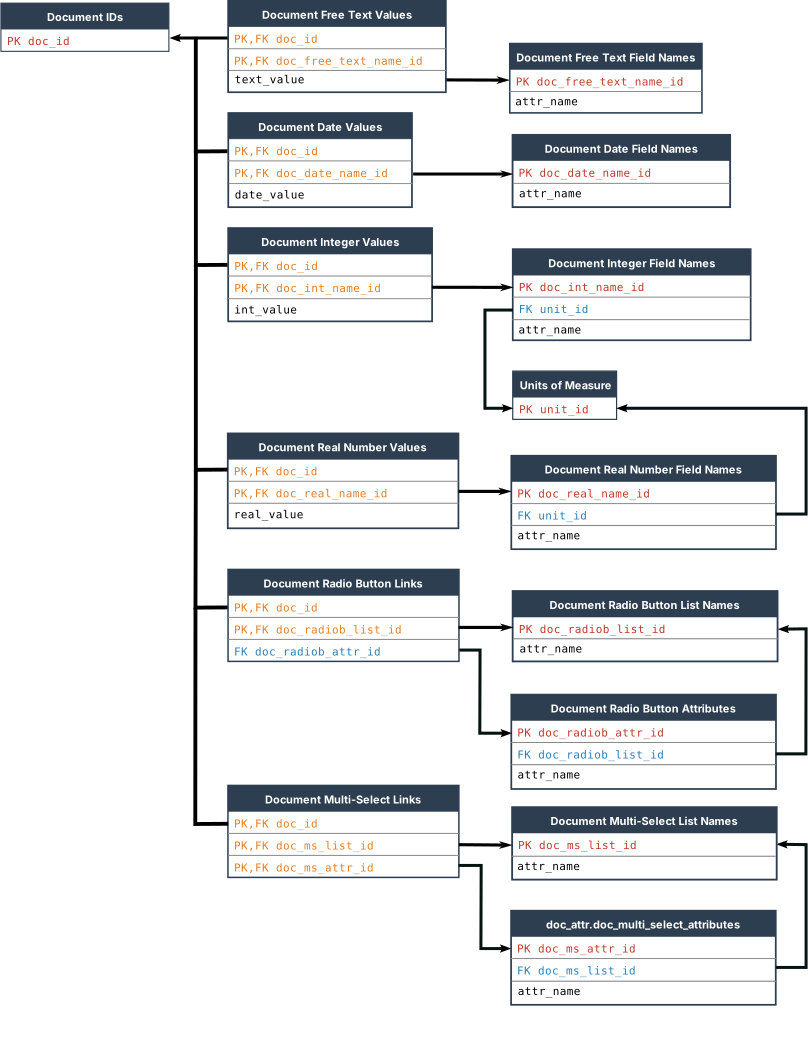
Common object type metadata can be either radio button lists or multi-select lists.
For each of the above metadata types, any number of custom fields can be created. For example, a free text document field would be used to store the document title. Another free text field could be used for a description and a separate field again for an abstract and so on. There is a many-to-many relationship between the metadata fields and documents or files.
The radio button and multi-select tables for documents and files comprise exclusive lists, meaning that an object can only be a member of one list. Radio button lists contain members where only one member from a given list can be selected at one time. Multi-select lists contain members where more than one member from a given list can be selected at one time. For example, a document radio button list with a list name of Publication Status could contain the following members: Reserved, Published and Superseded.
Document IDs and also files each have a number of one-to-one metadata fields. Each document ID has an associated lock status (explained below). Each document ID record also includes a record of when it was created and by whom. Each file record has an associated filename, file size, an optional retention date and also a content hash. The content hash is an SHA-256 hash of the content which is used for detecting duplicate files. Each file record also includes a record of when it was created and by whom.
The intent of the document ID lock status is to permit a document ID to be locked against change. A document ID can be locked by a controller but can only be unlocked by a configurator. For example, once a document has been published and many other documents contain cross references to it via its document ID, the document ID should not be able to be changed. Note that when a document ID is unlocked, the document ID string can only be changed if there are no links to files or cross references. Otherwise the referential integrity settings will prevent changes regardless of the lock status.
Both documents and files can also be linked to a Transaction Group table. This allows an otherwise random unrelated group of files for example to be grouped by a single identifier. For example, if a batch of files are entered as a single group there may be a need to retrieve the group as a set later. One document can only be linked to a single transaction group and one file can only be linked to a single transaction group.
The com_obj schema comprises non-exclusive lists. One object can be a member of more than one list but can only appear once in a given list. Objects in the com_obj schema are linked to documents or files via tables that constrain the links to either radio button or multi-select lists. Hence links via a radio-button link table will only permit one member of a given list to be selected. Links via a multi-select link table will permit more than one member of a given list to be selected. However the underlying lists are not themselves constrained as radio button or multi-select. An example of a common object list name might be Contributing Organizations. The common object might be XYZ Co. Common objects can also be linked to list members, such as Organization Name. XYZ Co could be linked to either a document or a file through a multi-select list.
A document or file can be linked to any number of the above types of metadata attributes. For example, a document can be linked to more than one radio button list member, providing each is from a different list.
Note that document groups are not considered metadata or an attribute but rather provide a mechanism for restricting access to documents.
Users are registered in the user_restr.sid_list table. When a registered user is to be listed as metadata then the metadata field must have a label. Labels related back to users, and user related data, are stored in people.general_field_names. Documents and files can be linked either directly to users or linked to functions or function lists. In any of these cases a general field name must be included. For example, a document can be linked to a user via the people.doc_to_people_list_links table and the link assigned a general field name of 'Author' in people.general_field_names.
TABLE SCHEMAS
The Elyse database contains approximately 200 tables. The following are the table schemas.
| Schema | Purpose |
|---|---|
base | This includes various base tables such as the document ID register, the files register, the list of transaction groups, plus some lookup tables |
com_obj | These are the metadata fields which can be linked to either documents or files |
doc_attr | These are the metadata fields which can only be linked to document IDs |
file_attr | These are the metadata fields which can only be linked to files |
forms | The forms tables control which data columns are included when data tables are presented and when forms are presented for editing data. |
people | These are the tables relating to users |
tagging | These tables manage tags. Tags are different from other types of metadata and are only used for searching, sorting and grouping documents. |
user_restr | These are the access control lists which control access to privileged data |
workflow_models | These tables define standard workflows. |
workflow_instances | These tables record the data as a workflow is applied to a document. |
xref | These tables handle cross references. |
STORED PROCEDURES SCHEMAS
The Elyse database contains approximately 1000 application-exposed stored procedures. The following are the application-exposed stored procedures schemas.
authorisingconfiguringcontrollingeditingreviewingreading
These schemas are used to group stored procedures and restrict execute permission for stored procedures according to different application roles. Other schemas are used for stored procedures and functions which are not accessible to the application layer.
In most cases a stored procedure will carry out a single function which comprises a create, read, update or delete action applied to a specific table. To find a stored procedure, first establish which table is applicable. On the List of Stored Procedures tab of the ElyseTablesAndStoredProcedures.xlsx spreadsheet the stored procedures for that table will be listed on the row for that table. The details of the stored procedure can then be found on the SP and TVF Definitions tab, or by examining the code directly.
APPLICATION ROLES
When an application connects to the database it must set an application role using credentials it knows. The application role will allow the application to execute stored procedures within the schemas for which it has been granted Execute permission. The following table lists the application roles and the schemas for which each role is granted execute permission.
| Application Role | Schema with execute permission |
|---|---|
authoriser | authorising |
configurator | configuring, controlling |
controller | controlling, editing, reading, reviewing |
editor | editing, reviewing, reading |
reviewer | reviewing, reading |
reader | reading |
Note that application roles only grant permission to execute a stored procedure. If the stored procedure provides access to privileged data it will carry out separate authentication checks against internal access control lists. Hence even if the application role credentials are stolen, an application can only perform actions that are permitted within the database by the Windows user account that the application is connecting with. Since each application role requires separate credentials, different roles can be managed independently by separate data access layers operating under different accounts, each with its own set of credentials.
USER ROLES
Within the database, users can be assigned one or more of the following user roles. These are used for data access control.
- Authorizer
- Configurator
- Controller
- Editor
- Reviewer
- Reader
Users who have not been granted a user role will still be able to access any data which does not have any data-level access restriction.
THE SECURITY FRAMEWORK
The security framework of the Elyse database is built on a zero-trust basis whereby the database has zero trust in the application layer. The application layer does not have any responsibility for user authentication. All user authentication is carried out internally within the database by direct querying of the security state of the connection. However the application must ensure that security context leakage does not occur. This is achieved by ensuring that connection pooling is not used.
The following security framework is applied.
The application backend runs under a limited privileges Windows account. It connects to the database using impersonation as the original connected user. After connecting to the database it sets an application role using credentials it knows. In a networked environment where the database is not on the same machine as the user, the application must be running under an account which has Kerberos Constrained Delegation (KCD) enabled.
The SQL Server must have a Windows authentication login account mapped to a Windows user group that all users are a member of. This login only has privileges to connect to the database (which inherently includes permission to execute sp_setapprole) – nothing else. In a networked environment the Windows user group must be created in Active Directory.
Application and user access to the database is only via application roles.
Each application role only has permission to execute a restricted list of stored procedures and does not have any access to underlying tables.
Before providing access to privileged data, each stored procedure will authenticate the connected user, using ORIGINAL_LOGIN(), each and every time the stored procedure is called.
Stored procedures are fully parameterized.
The stored procedures access the underlying tables via ownership chaining.
The stored procedures:
- do not contain any data definition language
- do not contain any data control language and
- do not contain any dynamic SQL capable of structural SQL injection
Hence applications and users other than a database administrator have no permission to alter the schema, alter any database permissions or execute any SQL code other than specific stored procedures.
Depending on the organizational security posture, a separate instance of the frontend for different roles can be applied to provide robust separation of access and ensure that an application cannot gain access to an unauthorized application role in the database.
The service account hosting the application backend should not be a member of the AD group mapped to the SQL Server login and hence should not be able to connect to the database without end user impersonation.
MFA and FIDO type authentication features are delegated to Windows.
THE PERMISSION STRUCTURE
The database has a permission structure which is managed within the database via stored procedures but without any data control language.
The permission structure within Elyse has two levels:
- Role level permission
- Data level permission
Role level permission permits the execution of stored procedures for the given role.
Data level permission permits access to data which is otherwise restricted.
In order to be able to connect to the database, the following requirements must be met:
- The user must belong to the user group mapped to the SQL Server login and
- The user must be using an application which knows the password for setting the required application role for the stored procedure which is to be executed.
In order for a user to perform a function other than for some read-only functions which do not require authentication, the following additional requirement must be met.
- The user must be listed in the
user_restr.user_role_linktable as having been granted permission for that role.
Executing a stored procedure works as follows.
- The application connects to the server via a Windows authenticated login which is mapped to an Active Directory user group which all users are members of. The login only has permission to connect to the database (and inherently also execute
sp_setapprole) - The application executes the
sp_setapprolestored procedure for the role which is necessary to execute the desired stored procedure. This only gives the application permission to execute stored procedures which the application role has been given permission to execute. - The application executes the user stored procedure. If user-specific permission is required for that stored procedure then the stored procedure checks that the user has that permission via the
internal.usp_AUTHENTICATE_user_rolestored procedure. - The stored procedure accesses the underlying tables via ownership chaining via the
ownership_chainapplication role which owns all schemas. - If the data is further restricted, such as with view permission filtering for example, then the stored procedure will restrict access within the data manipulation part of the procedure.
The privileges for a given user can be listed via authorising.usp_SEL_privileges_by_user.
The privileges for the connected user can be listed via reading.usp_SEL_privileges.
PERMISSION MANAGEMENT
Permissions are granted as follows.
Bootstrapping
A user who is to be granted authorizer privileges launches the database application and self-onboards by calling reading.usp_INS_self_onboard_sid. This enters their SID into the SID list and creates a SID ID but does not grant any privileges. A second different user must do the same.
A database administrator then reads the corresponding SID IDs for the two prospective Authorizers from the user_restr.sid_list table and copies them into the user_restr.authorisers table. New authorizers can now be subsequently authorized by any two authorizers without requiring DBA support by executing authorising.usp_INS_grant_authoriser. The DBA may also grant an Authorizer role privileges for any other role by directly entering records into user_restr.user_role_link.
Granting And Revoking Permissions
A user whose SID was linked to the authorizers table can now run an application which executes authorizer stored procedures. The application uses the password for the authorizer application role to execute sp_setapprole.
An authorizer executes authorising.usp_AUTHORISE_user_role to grant users role permissions by entering the corresponding user sid_id into the user_restr.user_role_link table.
Users with granted permissions can now access data managed by the stored procedures under the corresponding application role.
Further fine-grained permissions, such as document and file viewing and metadata editing permissions can be created via the following stored procedures: authorising.usp_AUTHORISE_doc_group_viewer, authorising.usp_AUTHORISE_contr_dc_grp_usr, authorising.usp_AUTHORISE_contr_fl_grp_usr, authorising.usp_AUTHORISE_form_group_owner. When a privilege is granted, the grantor and date/time stamp are recorded against the record.
Privileges are revoked via the following stored procedures: [authorising].[usp_DEL_doc_group_viewer_perm], [authorising].[usp_DEL_contr_doc_group_sid], [authorising].[usp_DEL_contr_file_group_sid], [authorising].[usp_DEL_form_group_owner]. Privilege revocations are stored in the table [user_restr].[user_privilege_revoke_log].
Granting Authorizer Privileges
Granting authorizer privileges is managed via the following application-exposed stored procedures.
[authorising].[usp_INS_grant_authoriser][authorising].[usp_INS_revoke_authoriser][authorising].[usp_SEL_authoriser_requests][authorising].[usp_UPD_cancel_authoriser_requ][authorising].[usp_SEL_authorisers]
The stored procedure [authorising].[usp_INS_grant_authoriser] is used by the first authorizer to create the initial grant request. The user SID ID must be supplied but no Request ID. At this point a request record is made with type equals Grant and status equals Pending.
The second authorizer must call the same stored procedure but supply the Request ID that was created by the first request. The status of the Request ID is then changed to Approved and the user is automatically granted authorizer privileges.
The revoke authorization works in the same way except that the type equals Revoke.
An authorization request can be cancelled via [authorising].[usp_UPD_cancel_authoriser_requ].
The system will not permit revoking of an authorizer when there are only two authorizers since DBA access would then be required to reinstate a second authorizer, noting that two authorizers are required to approve a third.
[authorising].[usp_SEL_authoriser_requests] lists the log of authorizer requests. This data cannot be modified or deleted without DBA direct database access.
De-Activating a User
To de-activate a user, an Authorizer calls authorising.usp_DEL_sid. This sets the user SID to a globally invalid SID. The user can be restored by calling authorising.usp_UPD_restore_sid. This will restore the SID from the restore_sid column. If the user being restored has authorizer privileges linked to the account then the restore will fail. The authorizer privileges must be removed from the user before the account can be restored after having been revoked. For audit record reasons, a user account can never be fully deleted, it can only be de-activated. Note that if a user is given a new Windows Account then the account will have a new SID, even if the username is identical. Windows Account SIDs cannot be re-used.
User Roles
The user roles are not entirely hierarchical. The Authorizer role cannot perform any of the other role functions. The Configurator role can perform some, but not all, of the controller functions. The functions of the Controller role include all of the functions of the Editor role. For example, a controller can edit the metadata for any document or file for which they have viewing rights to, and which is not restricted by a Controller Level Group. The Reader role permits creation and editing of a personal tag browsing tree. The Reader role also allows access to data such as unfiltered lists of documents and files. This is used, for example, to restrict access to superseded releases. A user with no role privileges can only gain access to filtered lists of files and documents, i.e. typically only the latest release of published documents. The stored procedures will however authenticate the connected user with respect to data level permissions as applicable. This means that while a reader-privileged user will have access to superseded releases of documents, they will not have access to documents which are restricted via document viewing group access control lists that they don't have membership of.
If the application layer is configured or deployed in a manner that allows a user to call a stored procedure for a role they do not have privileges for then the stored procedure will return an authentication error.
If a user does not have data level permission for the specific data managed by a given stored procedure then the procedure will return an error. For example, let's say that a Controller role user executes a stored procedure to read a particular file. The controller application role has role-level permission to execute the stored procedure. The particular stored procedure to read the file does not authenticate the role of the connected user before it proceeds because it can be executed by any user. However if the user does not have view permission for that file then the procedure will respond that the file id either does not exist or the user does not have view permission for it because the user does not have the data-level permission. For security reasons the error will not distinguish whether or not the file actually exists.
Controllers are granted permission to be form group owners by an authorizer by linking the user to a form group. A user who is a controller and also a form group owner will be able to create and modify forms which are linked to a form group which they are an owner of. A user can be granted permission as a form owner but if they are not also a controller then they will not be able to modify a form belonging to that form group. A controller can also create and modify forms which are not linked to any form group. A configurator can create or modify any form, including forms which are not linked to any form group. Hence if a configurator creates a form which is linked to a form group which in turn is not linked to any controllers, then only a configurator will be able to modify a form linked to that form group.
Document group view permissions link directly from document groups to the SID list. Document edit permissions however link to the SID list via duty function lists and people lists. The difference is that duty function lists and people lists are controlled by controllers. This is because these lists are used primarily for metadata. Document group view permissions are controlled by authorizers. Document metadata editing has a lesser security level requirement than document viewing.
Note that the schemas are not linked to user privileges. The schemas are linked to the application roles. Each application role has a separate set of application credentials. An application role is linked to one or more schemas, with permission to execute stored procedures within that schema.
Where a stored procedure provides access to privileged data which may be accessed by more than one role, the procedure will check all of the applicable roles and grant access if the user belongs to at least one of the applicable roles.
OVERVIEW OF ROLE PRIVILEGES
The role privileges are set in MSSQL SMS at Elyse_DB > Security > Application Roles > Securables. This is where the application roles are given permission to execute specific stored procedures.
Elyse role permissions are overlapping sets of permissions – they are not strictly hierarchical.
The general design policy for roles and permissions is as follows.
A key function of the Authorizer is to grant role permissions (i.e. Configurator, Controller, Editor, Reviewer, Reader) to Windows User SIDs. A Controller may create any document viewing group but only an Authorizer can link the document viewing group to a SID and hence restrict access. To reduce the risk of privilege escalation, an Authorizer is prevented from granting document viewing privileges to themselves. An Authorizer can only be granted document viewing privileges by a different Authorizer.
The Authorizer role controls the core security permissions of the database. The Authorizer role is restricted to authorising functions and does not inherently have rights of other roles. For example, with limited exception, an Authorizer cannot perform a Configurator or Controller function. A user can only be granted authorizer privileges by two existing authorizers.
The Configurator function is intended to only be used for setting up the database with respect to actions such as establishing and updating metadata fields and forms. Hence the role should not be required on a regular basis. There is some overlap between Configurator and Controller functions. For example, a Configurator can edit any form whereas a Controller can only edit forms which they have rights to.
The Controller function is intended to manage day-to-day administrative functions such as populating and updating metadata field lists. Note that a Controller cannot see documents and the metadata of documents which are restricted via document group permissions which they do not have permission for. There is some overlap between Controller and Configurator and also Editor functions. The main task that a Controller can carry out which an Editor cannot is editing forms.
The Editor function is intended to provide limited metadata editing functionality to users who are owners or editors of documents within document groups. This includes functionality such as creating new document records and adding files.
The Reviewer function is intended for users who have been granted permission to make a submission to a review process.
The Reader function is restricted to reading data, with the exception of personal tag browsing trees. As with all other levels, documents and associated metadata which are restricted by a document viewing group which the user is not a member of will not be visible.
Where different roles have permission to execute the same stored procedure, the schema of the stored procedure has been set to the lowest level of role. For example, if controller, editor and reader can all execute a given stored procedure then the schema for the stored procedure is set to reading. This keeps the permission structure simpler whereby there is a direct correlation between roles and execute permissions for schemas. The schema indicates to the application layer the lowest level of role access required to execute a given stored procedure. The application does not need to check what roles the connected user has permission for to decide which application role to set before executing a given stored procedure. It can just set the application role according to the schema.
Reader role privileges are required to execute stored procedures other than those that display filtered lists of files or documents. Hence, the data can be configured such that a user with no explicitly granted privileges cannot view any controlled documents other than the latest approved revision. Note that most reader schema stored procedures do not carry out any authentication within the stored procedure and hence are accessible regardless of whether the user has been explicitly granted Reader role data level permission. The application must set the reader application role but the user does not require reader data level access permission. A user with Reader role privileges can edit their own personal tag browsing tree and also access unfiltered lists of documents and files.
DATA LEVEL PERMISSIONS
Data level permissions work in the same way as role level permissions, except that the stored procedures apply them to restrict access to data rather than permission to execute the stored procedure. For example, this allows access to sensitive documents to be restricted to particular users, regardless of what role permissions they may have. Data is restricted via individual SIDs. If no SID has been entered for either then any user with the appropriate role privileges can access the data. If at least one SID has been entered in a table then only users matching the applicable SIDs will be granted access.
The interaction of role level permissions and data level permissions means that, for example, a user with Authorizer level permission can read and alter permissions but they cannot access restricted data unless they have been granted the associated permission.
Note that authorizers are able to read the names of all document viewing groups, even if they are not a member of a group and hence cannot view the associated documents or files.
ADDING FILES
The maximum size of file that can be inserted into the database is 2GB. Files are stored in a Microsoft SQL Server FILESTREAM container. Files are added using editing.usp_INS_file_binary_input. When a file is added, if the parameter @duplicate_check is set to On then a check is carried out to assess if the file being added has content identical to an existing file in the database. The insert transaction will not occur if a duplicate exists and @duplicate_check is On. If @duplicate_check is NULL then the value stored in base.global_settings_groups.duplicate_management is used. If @duplicate_check is set to any value other than On then the file will be stored regardless, however the message returned will still indicate if the file is a duplicate of an existing file.
When a file is loaded, an optional file group ID parameter may be included. File group IDs are used for managing file metadata editing permissions.
DOCUMENT RELEASE MANAGEMENT
A document can comprise a series of releases. A release has an associated Release Type, e.g. Revision, or Version, a Release Identifier, and a Release State. A release can also have an Effective From and an Effective Until date.
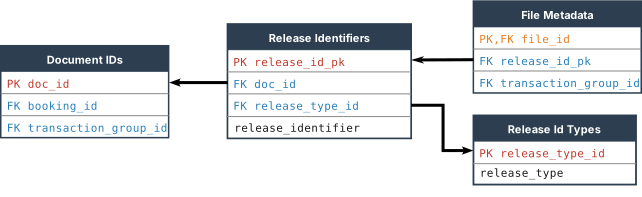
Release identifiers are stored in the base.release_identifiers table.
Elyse allows for releases to be identified by any text string. For example, a release series might be: A, B, C, 0, 1, 2, 3. Or it might be 1, 1A, 1B, 2, 2A, 3. For a given document ID a release identifier must be unique.
The purpose of the release state is for record control rather than workflow management. Examples of release states include: Published, Current, Obsolete, Cancelled, Archived, Superseded. Release states are user-configurable.
Each release state must have one of three fixed Release State Types.
MutableAuthoritativeHistorical
If a file is linked to a release then it will only be accessible to an unprivileged user if the release state type is Authoritative. When an unprivileged user views files in the context of a document ID then only a release which is Authoritative will be listed. An unprivileged user may be able to list files linked to a release which is not Authoritative, via various channels, but they will not be able to open such a file. A file which is not linked to any document release will be accessible to an unprivileged user however. If there is a requirement to restrict visibility of files which are not linked to a document release then this can be achieved using filter groups.
Releases with release state type of Authoritative or Historical are immutable, that is, files may not be added or removed from the release. The file membership list of a release with a release state type of Mutable may be changed. That is, files can be added or removed from the release.
When a release has been created and the release state is empty, the release state can be set to a release state with any release state type. This permits migration of data from legacy systems unchanged and without enforcing workflow management rules. However once a release state has been set, restrictions apply to what changes can be made to the release state.
A release with a state type of Mutable can only be changed to a state with a state type of Authoritative or another state with a state type of Mutable. A release with a state type of Authoritative can only be changed to a state with a state type of Historical or another state with a state type of Authoritative. A release with a state type of Historical can only be changed to a state with a state type of Authoritative or another state with state type of Historical, except if enforced retention is not On. If enforced retention is not On then it may be changed to Mutable. Elyse ships with enforced retention on. For a given document ID, a maximum of one release can have a release state type of Authoritative.
When the state of a release is changed to Authoritative, an existing release for the same document ID which has a state of Authoritative will be automatically changed to the state which has a release state type of Historical and which is the default historical release state.
Release state types control whether or not files can be added to or removed from a release and whether or not a file will be visible to an unprivileged user. However release state types do not control editing of file or document metadata. The philosophy is that the primary object which must be protected against change is the file and the set of files which comprise a release. The metadata merely references the file and controls access to it. Critical metadata which must remain immutable, such as who approved a document, should be embedded within the file, such as by cryptographic signing.
A release identifier creates a link between files and a document. Each release can have any number of files linked to that release, for example a source file and a published rendition file. The source may also comprise a set of files of different formats for example. One file can be linked to only one release identifier, which in turn can be linked to only one document. A release identifier must be created and linked to a document before it can be linked to a file.
Separately from a release identifier link, a file may be directly linked to more than one document. However the document that is linked via a release identifier is given special treatment. This is the document that is displayed in file lists. When a file is linked to a release identifier, if the document linked to the release identifier is not already linked to the file then a direct link will be automatically created at the same time. Similarly, the direct link between a document and a file cannot be deleted if the file and document are also linked via a release identifier.
Note that in addition to the release state type, the visibility of files and documents can also be controlled via customizable filter group filters linked to metadata list fields such as File Format. This allows for source files to be stored as part of a release set but not made available to unprivileged users.
The Elyse database layer does not, for example, control which release or file is the current release. This means that a document release can be rolled back by changing the status of a release without interfering with the list of document release identifiers or copying any files. The design also allows for a release to comprise more than just a source file and a corresponding published rendition file. As a general operational rule there should only be a single file which is both the current latest release and also the published format rendition, as the master file. All other linked files are support files. However Elyse does not enforce this rule because the published document may comprise a PDF plus an associated data spreadsheet for example.
The Effective From and Effective Until dates define a window within which the release will only be accessible to an unprivileged user within that window, in addition to the constraint that the release state type must be Authoritative. Note however that the database does not automatically change the release state type. The decision to change a release state type, such as making a release authoritative, is a governance function which is outside of the scope of control of the database. Hence Elyse distinguishes three different functions:
- Approval
- Release
- Effective
For example, an approver might cryptographically sign a file as approved. The file is then passed to a document controller who controls the release of documents according to business governance rules. The release might also have an expiry date after which it will automatically be made unavailable to unprivileged users.
To create a document release, perform the following.
- Locate the document ID.
- Create a new release identifier for the document ID.
- Link the file to the release identifier.
- If the file is to be released as the current latest release, then change the File Status to
Currentand, if it is the published format file, change the Format toDistribution File. Change the status of the superseded files toSuperseded.
A release can be linked to a Release ID Type. Default types are Revision and Version. A configurator can edit the release type table. A release can be created without a release type, but this will mean that the release identifier (e.g. 'A') will not appear in some output tables because the release type is used as the column identifier.
If the Release Lock setting in Global Settings is set to On then updating and deleting of release-related records other than status will be blocked. This setting can only be changed by a database administrator. Release Lock should only be set to On when these records are automatically created by the application layer rather than manually by the user.
DOCUMENT GROUP VIEWING
Document viewing groups are used to restrict access to documents and associated files. This can be used for sensitive documents for example. Any other document grouping purpose can be met using metadata. Document viewing groups allow for collections of documents to be segregated between different groups of users such that users will have no visibility of documents or metadata of other groups, regardless of their role in the system.
The document viewing groups function works as follows.
If there are no SIDs assigned at all → allow.
If there are SIDs assigned, but the user's SID is not among them → exclude.
If there are SIDs assigned, and the user's SID is among them → allow.
The workflow sequence for document viewing control is as follows.
A user with controller permissions creates a document viewer group name. At this point any files linked to that document viewer group will be visible to anyone.
A user with authorizer permissions links the document viewer group name to a user SID ID via authorising.usp_AUTHORISE_doc_group_viewer. (The user must have already been onboarded via reading.usp_INS_self_onboard_sid.) The authorizer cannot self-authorize. From this point onwards only users who are linked to the document viewer group will be able to see any records of documents linked to the document viewer group or add documents to the viewer group. Any file which is linked to a document which is restricted will be restricted in the same manner as the document. The stored procedure internal.usp_AUTHENTICATE_user_doc_id checks if a user has permission to access a given single document. Other stored procedures which access documents, such as reading.usp_SEL_all_documents, perform the same check.
Controllers who have document view permission for a given document viewer group may link documents to the document viewer group.
If multiple document groups are linked to a document and the document viewer groups have different groups of users linked to the different document viewer groups then all users who are linked to the different document viewer groups will have rights to the document.
Document viewer group permissions are revoked via [authorising].[usp_DEL_doc_group_viewer_perm]. NOTE: Because documents are viewable by default if there are no users linked to a document viewer group, deleting the last user from a document viewer group will render all the documents of that group viewable to all users. For this reason it is not possible for an authorizer to delete the last user from a document viewing group unless there are zero documents linked to that group.
Documents are viewable by default. A document only becomes restricted for viewing when there is at least one SID linked to a document group via document group viewing permission.
METADATA EDIT PERMISSIONS OVERVIEW
Edit permissions for metadata are divided into two layers. At the first layer are permissions that are granted by authorizers to controllers. These are referred to as controller level permissions. This gives members of the group exclusive metadata editing rights that cannot be altered by other controllers.
The second layer of edit permissions are permissions that are granted by controllers to editors. These are referred to as editor level permissions. Any controller can alter any editor level permissions. Any controller can also edit the metadata of any document or file which they are not excluded from through controller level permissions. A controller can grant editor level permissions to any user. The edit permissions authentication does not check if the user has editor rights for editor level permissions, however a user will not be able to perform editor functions if they do not also have editor level rights because the role authentication check within the stored procedure will fail.
An application of the above structure would be as follows. In a large organization, controllers in different branches of the organization must be able to view organization-wide published documents but must not be able to edit the metadata of such documents unless they have been explicitly granted that permission. Hence controller level permissions should only need to be altered if the organization structure changes. Controllers would be granted specific controller level permissions by being added to a given controller level edit permission group. Within a branch of an organization, controllers must be able to grant document owners permission to edit metadata of documents which they own. This is managed through editor level permissions. However editor level permissions are overridden by controller level permissions.
CONTROLLER LEVEL PERMISSIONS
Controller level file and document group permissions can only be granted by Authorizers. These permissions give members of the group exclusive metadata editing rights that cannot be altered by other controllers.
Users are linked to controller groups via the following stored procedures.
[authorising].[usp_AUTHORISE_contr_dc_grp_usr][authorising].[usp_AUTHORISE_contr_fl_grp_usr]
If a user is linked to a controller editing group but does not also have controller rights, or later ceases to have controller rights, then the controller level edit permission authentication will fail.
Controller groups for files and documents are stored via the following tables.
[xref].[controller_doc_group_names][xref].[controller_doc_group_links][xref].[controller_file_group_names][xref].[controller_file_group_links]
DOCUMENT GROUP EDITOR LEVEL PERMISSIONS
The following applies to editor level permissions only.
Document group editing permissions function differently from document group viewing permissions. Whereas document viewing groups are accessible for viewing by default, document editing is restricted by default.
The following stored procedures handle document group editor level permissions.
controlling.usp_INS_duty_function_sid_linkcontrolling.usp_INS_doc_gp_ed_perm_functcontrolling.usp_INS_doc_gp_ed_perm_people
Another difference between edit permissions and viewing permissions is that viewing permissions are managed at Authorizer role level whereas editor level editing permissions are managed at Controller role level.
Document group edit permission grants an Editor role user permission to edit metadata associated with a document which is a member of a document edit group. The authentication of document group edit permission first checks if the user has viewing permission for the document group and fails if the user does not have viewing permission. Hence a user can be on a list which has document group editing permission but the permission will not be effective if the user does not also have viewing permission. This is performed by internal.usp_AUTHENTICATE_doc_ed_perm.
Only controller and Editor roles can edit document metadata. Either a Controller or Editor role user can only edit metadata for documents for which they have viewing permission and edit permission. A controller can create a document group and grant access to an editor.
There are two ways in which an Editor role can gain editing permission for a document. If a controller adds a user with Editor role permissions to the membership of a duty function list which is linked through to a document group then the user will have editing permission for any document within that group. A user with editing role permission can also create a document id and specify a document editing group for which they already have editing permission. When the document ID is created it will be automatically linked to that document group. The user can therefore be given a sandbox within which they can create documents and then edit the metadata for the document they have created. See editing.usp_INS_document_id_restr.
Document radio button lists and file radio buttons lists include a column named restricted. If the value of restricted is set to True then only a user with Controller role will be able to create or update a link between a member in that list and a document. An example of how this feature can be used is for setting the publication status of a document. An editor may have permission to set various metadata for a document they have edit permission for but be prevented from setting or changing the publication status. Only a document controller would be able to set or change the publication status.
FILE VIEWING
User permission to view a file is determined by the following:
- File permission authentication
- Document release state type
- Default filter group filtering
File permission authentication is carried out by internal.usp_AUTHENTICATE_user_file_id.
The release state type and default filter group conditions are applied if the user does not have Reader, Reviewer, Editor or Controller privileges.
All file access passes through a single stored procedure: reading.usp_SEL_file. This procedure applies all three of the above conditions before permitting file access. Hence under some circumstances an unprivileged user may be able to discover the existence of a file that passes the permission filter applied by a search function but not be able to access it if it fails the default filter group filter or the release state type check. This single point of access to files also means that these rules will be enforced regardless of the pathway or interface through which the file is being accessed.
A user has permission to discover a file if one of the following conditions are met:
- The file is not linked to any document, or
- The file is linked to a document and the document is not linked to any document viewer group, or
- The file is linked to a document and the document is linked to one or more document viewer groups but no group is linked to a SID, or
- The file is linked to a document and the document is linked to one or more document viewer groups linked to a SID which is linked to the user.
Hence a file can only have restricted discoverability applied if it has been linked to a document ID.
A given document can be linked to multiple files. One file can be linked to multiple documents. If a file is linked to a document which is restricted and is also linked to another document which is not restricted, then listing the files for the unrestricted document will not list the file unless the user has viewing permission for it.
File permission filtering is carried out by the function internal.ufn_SEL_files_permission_filtr_ITVF.
Permission filtering conceals the existence of a file from users in addition to preventing direct access.
In addition to the permission filter, the document release state type filter applies the following constraint:
- If the user does not have Reader, Reviewer, Editor or Controller privileges and the file is linked to a document release, then the user will only be able to open the file if it is linked to a release with release state type of Authoritative and it is effective according to the optional effective_from and effective_until dates.
See Filter Groups for an explanation of filter group filtering.
FILE GROUPS
File groups are used for managing rights to edit the metadata of files. File groups are managed at controller level.
Unlike document groups, file groups do not have a corresponding file viewing group permission. File viewing restrictions are managed via linking of files to documents which in turn have viewing restrictions applied. This avoids a clash between document viewing restrictions and viewing restrictions applied to files which are also linked to documents with a different set of restrictions. There is only one set of viewing restrictions. However, this arrangement also means that, unlike document groups, all users have permission to see all file groups. With document groups, other than authorizers, only users with permission to view a document group can view the details of the document group. Hence file group details, such as name or description, should not be used for storing sensitive information.
FILE GROUP EDITING
The following applies to editor level permissions only.
File group edit permission grants an Editor role permission to edit metadata associated with a file which is within a file group.
File metadata editing is restricted by default. A Controller role can edit any metadata for any file for which they have viewing permission and for which they are not excluded by controller level edit permission restrictions. An Editor role can only edit metadata for a file for which they have viewing permission and edit permission.
The authentication of file edit permission first checks if the user has viewing permission for the file. See internal.usp_AUTHENTICATE_user_file_id. If the user has viewing permission for the file a check is then made to establish if there is a link from the file back to the SID of the connected user. The authentication will fail if there is not a link from the file to the user SID.
File group edit permissions are managed at Controller role level. However, an Editor role user can grant themselves permission to edit metadata of a file by linking the file ID to a file group, editing.usp_INS_file_group_link, providing all of the following conditions are met:
- The connected user has viewing permission for the file,
internal.usp_AUTHENTICATE_user_file_idand - The file is free from edit restrictions which exclude the current user, (i.e. the file has edit permissions for other users but not the connected user), or it has no edit permission restrictions at all. (See
internal.usp_AUTHENTICATE_file_ed_free) and - The connected user has edit permission for the file group which the file is to be linked to. (See
internal.usp_AUTHENTICATE_fl_grp_ed_pm.) File edit permission for a user must be granted by a user with Controller level permission, except where the user creates a personal person list. Seeediting.usp_INS_personal_people_list.
This allows an Editor role user to add a file and then edit the metadata for that file. The user must first have edit permission for a file group. An Editor role cannot delete a file to file-group link however. Deleting the file to file-group link is a Controller role level function. Otherwise an editor level role could remove file edit permissions from other users.
Note that a controller level user can create, edit and delete file groups and they can grant file edit permissions but they cannot edit metadata for a file unless they have the required file edit permission.
editing.usp_INS_file_binary_input has an input parameter of @filegroupid which allows the user to specify a file group ID to link the file to and hence allow them to edit the metadata, providing that they have already been granted permission for that file group.
FORMS
All metadata for documents and files can only be presented via a form definition, with the exception of reading.usp_SEL_document_details and reading.usp_SEL_file_details. Form fields are user configurable by creating a link between a form ID and a metadata field. Those links are then referred to by reading functions which use the form ID to determine which data fields to return.
One form can contain a mixture of both document links and file links. Where there is a link between a document and a file via the table xref.file_to_document_links then retrieving document data via reading.usp_SEL_one_document_data for example will also return the data for the file. Retrieving file data, such as via reading.usp_SEL_all_files does not retrieve linked document data since files are subordinate to documents.
Data result tables include either document data or file data. The following table columns are presented.
| Record | Document ID | File ID | Field Type | Name | Attribute ID | Value | Units |
|---|
Data result tables for documents only will omit the File ID column. Data result tables for files only will omit the Document ID column. All other columns will remain the same. Following is an example of a data result table.
| Record | Document ID | File ID | Field Type | Name ID | Name | Attribute ID | Value | Units |
|---|---|---|---|---|---|---|---|---|
| 1 | BFRY | NULL | Doc Radio Button Attributes | 20226 | Publication Status | 10011 | Published | |
| 1 | BFRY | NULL | Document Free Text | 1 | Title | NULL | Safety Policy | |
| 2 | RTQH | NULL | Doc Radio Button Attributes | 20226 | Publication Status | 10011 | Published | |
| 2 | RTQH | NULL | Document Free Text | 1 | Title | NULL | Quality Policy |
Example of a data result table
The application must parse the data for presentation to the user. For example:
| Document ID | Publication Status | Title | Release | Size - Bytes |
|---|---|---|---|---|
| BFRY | Published | Safety Policy | 3 | 525535 |
| RTQH | Published | Quality Policy | 2A | 4576457 |
Example of table displayed by the application
The data is de-normalised. Each row in the data result table represents one field in the final table displayed by the application. Each number in the record number column represents one row in the final table. The reason why this parsing must be carried out by the application and is not carried out in a database stored procedure is because it would require the use of dynamic SQL, which would increase security risk to the database. The parsing must be carried out because the number of form fields is not fixed.
All the fields for a given form can be retrieved via the reading.usp_SEL_all_form_fields stored procedure.
If a particular field is listed as a form field but there is no corresponding field linked to the given document or file then no record for that field will be returned. Hence the number of rows in a data results table for a given record number can be less than the number of form fields. The application has to work out which ones are missing and create the blank table fields.
Defaults can be stored against forms for each of the metadata fields which comprise a list. This data is not used within the database and is only used to inform the application.
All the defaults for a given form can be retrieved via the reading.usp_SEL_all_form_defaults stored procedure.
The base.global_settings_groups table contains a field for a default form ID. This is used by the stored procedure if the application does not supply a form ID.
Each form can be linked to one form group. Form groups in turn are used for managing form editing privileges.
FILTER GROUPS
Filter groups are groups of metadata fields that are used to automatically filter results. For example, when retrieving a list of documents the application may need to display data according to the following rules.
- Only list document IDs which have a Document Status of
Published, as opposed to Reserved or Superseded for example. - Only list files linked to a given document ID which have a File Format of
Distribution Format, as opposed toSource Filefor example.
By creating a filter group with Document Status equals Published and File Format equals Distribution Format, results can be retrieved which comply with the above rules. Source files can be stored in the same database but retrievable via a channel which is separate from that which returns the distribution format files. A Controller must ensure that the metadata is correct and consistent, but the filter group will take care of how the data is presented.
Filter groups can also be used for other purposes such as providing easy access to pre-filtered lists, such as a list of department-specific documents.
The following tables are used for defining filter groups.
doc_attr.doc_radiob_attr_fgroup_linksdoc_attr.doc_ms_attr_fgroup_linksfile_attr.file_radiob_attr_fgroup_linksfile_attr.file_ms_attr_fgroup_linksfile_attr.file_rel_state_fgroup_links
Of the various stored procedures which retrieve document and file data, some apply a filter group and some do not, depending on the context. For example reading.usp_SEL_docs_by_text_field applies a filter group whereas reading.usp_SEL_all_documents does not. Whether or not a command applies a filter group will be indicated in the description of the command. The stored procedures which are named *SEL_all*, plus the stored procedures for retrieving data by transaction group, do not apply filter groups and, where applied to documents, do not retrieve the files associated with the retrieved documents. The other document and file data retrieval stored procedures apply a filter group.
The Global Settings has a default filter group. This is used for the filter group which will filter documents and files to only present those which are current. Hence the application is configured such that search forms for unprivileged users do not have an option to select an alternative filter group. To select alternative filters, or execute commands that provide unfiltered lists, requires explicit role privileges to be granted. Elyse ships with a default filter group but it does not contain any field links. Fields must be added to the filter group by a Configurator.
Visibility and access to files is also controlled by Release Management. Filter groups provide a customizable layer above the release management system. The release management system enforces hard business rules such as only permitting one release for a given document ID to be authoritative and hence visible to unprivileged users. For example, a release file set might comprise a PDF published rendition file and a source file. The default filter group can be configured to filter out the source file for unprivileged users.
Note that the release management system only controls releases for a given document ID. It does not control whether an entire document series has been withdrawn for example. Concealing a document from discovery by unprivileged users because it has been withdrawn or cancelled must be achieved via filter group configuration.
In order to view, for example, superseded releases of documents via a stored procedure which does not apply a filter group, the user must at least have been granted Reader role privileges. This framework allows users to be able to search for any unrestricted documents without needing to be granted specific access privileges. Any user who has access to the application can view unrestricted documents. However access to restricted documents requires the granting of access privileges.
A user with Editor role privileges can load a file into the database. However in order for that file to be visible to unprivileged users the metadata must be set so that it will pass the default filter group.
The stored procedures which present filtered results must apply a filter. The filter can either be supplied by the calling application or the default can be used from base.global_settings_groups.default_filter_group_id. Hence the application can be configured to not provide the user with the option to select a filter group and hence force the application of the default filter.
ERROR HANDLING
Every stored procedure that is callable by the application includes output parameters named Message and Transaction Status.
The Transaction Status parameter can have one of three values: Good, Bad or Transaction not attempted. This indicates the outcome of the transaction. For example, if the data validation in the stored procedure fails then the transaction will not be attempted. If the transaction is attempted but fails then the Transaction Status will return as Bad.
The Message parameter is a concatenation of messages from the stored procedure. For example, if any data validation fails then the reason will be explained in the message. If a transaction fails then the error number and error message returned from the database server will be included in the message. Not all stored procedures conduct comprehensive referential integrity checks before carrying out a transaction and hence the database server generated message may be returned when the transaction is attempted but fails on referential integrity.
MESSAGE TABLES AND LANGUAGE CUSTOMIZATION
The text of messages returned by the database are listed in the table messaging.message_details. Each message text has an identifier. The message identifiers are listed in the table messaging.message_id_list. The message details table can be extended so that the messages are presented in a different language.
IMPORTANT: Do not alter the existing message records in the message tables.
Each message in the messaging.message_details table has a corresponding language code referring to the messaging.language_list table. This is a table of ISO 639-1 language codes.
Changing languages can only be carried out by a database administrator editing the tables. To change the language of the messages, the following three steps must be undertaken.
- Add the language code to the
messaging.language_listtable. - Extend the
messaging.message_detailstable with all of the messages translated to the new language, each with thelanguage_idcorresponding to the new language. - In the
base.global_settings_groupstable, change thelanguage_idfor the record with thesetting_group_nameofMasterto the new language code.
The stored procedures will then automatically return the message in the new language.
IMPORTANT:
- Do not omit any messages. All messages from the original EN list must be included in the new language.
- The message IDs must not be altered since they are hard-coded into the stored procedures.
Note that some of the table headings returned by the database are user-configurable and some are hard-coded in English.
GLOBAL SETTINGS
The base.global_settings_groups table contains sets of global settings used by the stored procedures. The values can be listed by executing reading.usp_SEL_global_settings.
The stored procedures will refer to the record which has a setting_group_name of Master. Any number of settings groups can be created so that global settings can be easily switched. However there must always be one record with a name of Master. To switch between pre-configured settings groups, change the existing record with a name of Master to something else and then change the new settings group record name to Master.
The table base.global_settings_groups contains the following settings columns.
| Column | Description |
|---|---|
language_id | Selected language for visible text messages. Select from valid values in messaging.language_list. |
is_register_code_applied | Valid values are Yes or No. Used by the stored procedure to decide whether the register code prefix is to be applied to an auto-generated document id. |
register_code | Register code is a type of namespace. It is an optional code prefix that is appended to an auto-generated document id to differentiate distinct registers within an organization. Register codes should not be used to encode metadata but rather should be used just to keep IDs from separate registers visibly distinct, for example if the different registers are accessed through different interfaces and the user will need to know which interface to use. The register code could be used to reduce the risk of document IDs being duplicated across different organizations, while still keeping the ID length short, as opposed to using a GUID for example. The organization's stock ticker could be used for this purpose. If two organizations merge then the document IDs won't clash. |
aut_gen_doc_id_length | Valid values are 4, 6 or 8. This is the number of letters in the auto-generated document ID. Select the lowest applicable number. Use 4 where the maximum prospective number of document IDs will be less than 100,000. Use 6 when the maximum will be less than 25,000,000 and 8 when it is greater than 25,000,000. See internal.usp_SEL_random_doc_id for more details. |
auto_gen_doc_id_on_null | Valid values are Yes or No. This is a flag to instruct usp_INS_document_id to autogenerate a document id if none is supplied. |
doc_id_format | This column is used by the document ID autogenerate function to determine if the auto-generated document ID is to be an alpha string, e.g. BCDF, or an integer, e.g. 12345. Valid values are Alpha or Integer. |
doc_id_last_integer | This column is used as a record of the last integer type document ID used. |
date_style | The default date style used for representing date values. The content of this column must match an entry in base.datetime_styles. |
culture_code | Culture code is used to localise applications. It is a combination of ISO 639-1 language code and ISO 3166-1 country code. |
doc_autogen_max_tries | The maximum number of attempts for generating an auto generated document id. |
default_filter_group | The default filter group that will be used by stored procedures which are intended to provide common functions. This avoids the need for the application to include data which is hard coded to match configuration data. e.g. a default filter group which can be aligned with a configuration which allows retrieval of files which are published format, as opposed to source files, and which are the current latest revision and are linked to a document ID which is published, as opposed to withdrawn. |
default_form_id | The default form ID is used by stored procedures when no form ID has been supplied by the calling function. With limited exceptions, all file and document data can only be returned via reference to a form ID which specifies which fields are to be returned. This field cannot be NULL. |
default_doc_free_text_name_id | This is used by stored procedures for a default free text name id where none has been supplied. It can be configured to point to document 'Title' for example. |
default_tag_tree_id | This is used as a default if no tag tree id is supplied. |
default_tag_browsing_tree_id | This is used as a default if no browsing tree id is supplied. |
duplicate_management | This indicates whether a file which is a duplicate of an existing file is to be rejected. Valid values are On, Off, or NULL. |
created_last_minutes | This field is an integer number of minutes. It is used to retrieve documents or files that were recently created. |
enforced_retention | This is a flag that informs stored procedures whether enforced retention of files is on or off. Valid values are On, Off or NULL. NULL will be treated as Off. |
file_read_log | This is a flag that informs stored procedures whether the file read log is on or off. The file read log logs when files are opened. Valid values are On, Off or NULL. NULL will be treated as Off. |
file_delete_log | This is a flag that informs stored procedures whether the file delete log is on or off. The file delete log logs when files are deleted. Valid values are On, Off or NULL. NULL will be treated as Off. |
file_doc_change_log | This is a flag that informs the stored procedures whether the file file/document change log is on or off. |
release_lock | When this is on it is not possible to change either a file to release link or a release number record. This should only be used when these records are automatically created by the application layer rather than manually by the user. |
store_plain_text_content | This is a flag that informs the stored procedure whether or not to store plain text content. Valid values are On, Off or NULL. NULL will be treated as Off. |
store_thumbnails | This is a flag that informs the stored procedure whether or not to store file thumbnails. Valid values are On, Off or NULL. NULL will be treated as Off. |
default_doc_date_name_id | This is the default document date name ID to be used. For example, it can be used as the next review date. |
booking_in_time_box | Time limitation, in minutes, after which a book-in record cannot be deleted. |
never_delete_files | If this is set to On then deleting files is globally disabled. If the prospective number of files could exceed one million then applying this setting at the outset before populating the database will significantly improve performance. |
Note that for reasons of database integrity, other than date_style there are no stored procedures for updating global settings. Global settings can only be changed with direct DBA access to the table.
TAGGING
Document tags are used primarily for sorting, grouping and finding documents. They are used like an index usually found at the back of a book, as opposed to a table of contents and publication details found at the front of a book. Tags differ from other types of metadata fields in that they are intended to be flexible as opposed to rigidly fixed, and are potentially large in number.
Tags are particularly useful for files which do not contain any text content, such as scanned drawings for example.
In this database tags can be arranged in a taxonomical hierarchical tree, referred to as a Tag Relationship Structure (TRS), or tag tree. In the TRS a reference to a tag automatically refers to any descendant tags in the way that reference to 'fasteners' inherently includes reference to both bolts and screws for example. This means that a document tagged only with the tag 'bolts' can be retrieved with a search of the tag 'fasteners' if the TRS includes the parent-child relationship between fasteners and bolts to indicate that bolts are fasteners. The TRS represents a Boolean logic OR combination of a given tag and all of its descendants.
Tag trees can be linked to duty function lists and people lists. Only members of the associated lists can edit a tag tree.
A separate type of tree, referred to a browsing tree, represents a logical AND of the tag at that node and all of the ancestors above the node. This allows a user to construct a structure through which a progressively narrower search is conducted by progressing down the tree. Unlike a TRS, browsing trees don't impact the function of a tag. They comprise what may be considered a structure of saved searches. Each node on the tree is like a saved search. A node in a browsing tree can also be inverted such that documents with the tag at that node, and any of its descendants in the TRS, will be excluded. This is a logical NOT. Hence when used in combination with tags arranged in a TRS, a browsing tree node can construct any Boolean logic combination of tags.
Tags are only linked to documents, not files. When conducting a search of documents by tag, a single TRS may be specified. If a TRS is not supplied then the default from the global settings table will be used. Use of TRS can be turned off by setting the @tag_descendants parameter to 'OFF'.
The following are the types of tag-related permissions:
- Permission to link tags to a given document
- Permission to edit a given tag
- Permission to link a given tag to a given tag group
- Permission to edit a tag relationship tree
- Permission to edit a tag browsing tree
With one exception, tag-related permissions are managed via duty function lists. Hence, for each permission type there is a table linking to function lists. Authentication of a permission is established if there is a path through to the connected user. The exception to the function list is a personal browsing tree that can only be linked to one reader user.
Tags can be created by any user who has either Controller or Editor role. A tag can be linked to a tag group.
Tag groups can only be created and edited by controllers.
Tag groups in turn can be linked to duty function lists. When there is a link from a tag through to a duty function list then editing or deleting the tag will be restricted to members of that list. A user can only link tags to a tag group which they have rights to. All controllers have rights to all tag groups by default. A tag which is not linked to any tag group can be edited or deleted by any user with Controller or Editor role permissions.
Tags can be linked documents, providing that the user has editing rights for the document. See internal.usp_AUTHENTICATE_doc_ed_perm.
Tag group permissions grant a user permission to link tags to a given tag group and also to edit the tag. For example, a business section may have their own tag group that they manage. Any controller has rights to any tag group.
A tag that is not linked to any tag group can be edited by any controller or editor. A tag that is linked to at least one tag group can only be edited by users who have rights to one of the tag groups or who are a controller. Hence, an editor can create a tag. At that point the tag can be edited by any other editor. The editor can then link the tag to a tag group that they have rights to. From that point on only editors who have rights to the given tag group can edit the tag. Any controller can link the tag to any other tag group and hence grant editing rights for the tag to a different editor who does not have rights to the first tag group. A controller can edit any tag.
A tag may only be linked to a tag group if the connected user has both edit rights to the tag and also rights to the tag group.
TRS tag tree permissions grant a user permission to modify a given tag tree. Only a controller may create a new TRS. But once created, the TRS nodes can be edited by anyone who has been granted edit permission for that tag tree. To add a tag to a tag tree the user must also have edit rights for the given tag. This is because even though the tag itself isn't being changed, the function of the tag is being changed.
Tag browsing tree permissions grant a user permission to modify a given tag browsing tree. The editing permissions for browsing trees are managed in the same way as for tag trees by linking through to duty function lists and people lists, with the following additional permissions. All controllers may edit any tag browsing tree. If a user is linked directly to a tag browsing tree then they may edit the tag browsing tree.
Permissions to link tags to tag groups, edit tag trees and edit tag browsing trees can be created or modified by any controller. Permissions to link tags to documents can be created or modified by any controller who has viewing rights for the given document group.
A Reader role user can have one or more tag browsing trees that are linked directly to the user. The user can create and edit a personal tag browsing tree. A controller can edit and delete another user's personal tag browsing tree. In order to create a personal tag browsing tree the user's SID must also be in the SID list.
WORKFLOW MANAGEMENT
Apart from the operating system, the Elyse database is application layer agnostic. It is designed to function independently of document file editing software and hence cater for any type of file produced by any existing or future file editing software. The application layer may exploit the markup functionality of file editing software but will need to store the marked-up file separately from the original file. In the interests of providing a secure immutable historical record, no functionality is provided to alter files stored in the database. Files can only be either inserted or deleted. Hence, simultaneous collaboration functionality must be handled at the application layer. If a finely grained and single comprehensive record of the history of all of the markups or changes and comments made to a file is required then the file must only be inserted into the database after all changes or markups have been completed.
Workflow management can be applied to documents. A workflow model defines the steps that are to be applied to a workflow. Workflow instances comprise a copy of a workflow model as applied to a particular document for a particular instance.
Workflow models are defined using a graph database. This defines the nodes and edges that comprise a graph. Any type of graph can be created, including graphs with cycles. The nodes of the graphs are referred to as workflow steps. The edges are referred to as step transitions. At each step transition there can be a defined workflow action. For example: revise, review, approve, publish. Each step transition can also be linked to one or more workflow rules. An example of a rule might be 'all participants must respond', or 'time-limited review, after which progress proceeds automatically to the next step'. Workflow rules can contain up to three integer values. These values can be used by the application for purposes such as defining intervals for review expiry warning and review expiry.
A workflow instance links a single document with a workflow model. Workflow instances contain steps which are linked to the workflow model step definitions. Associated with a workflow instance definition is a present step identifier. Each step can be linked to one or more input files. Each workflow step can be linked to a step status definition, for example: planned, in progress, completed. Each workflow instance step can contain up to three dates which can be used by the application for purposes such as recording start and end date of the step for example. Each workflow instance step can be linked to one or more workflow step participants. This links the step back to individuals. The steps can also be linked to duty functions, which links the step to duty functions, which are in turn linked to individuals. Each of the workflow step participants or duty functions can be linked to a workflow output definition, such as: approved, revise and resubmit, rejected. Each of the workflow step participants or duty functions can also be linked to one or more output files. These are the copies of document markups for example. A separate copy is stored, rather than depending on the internal markup features of the file editing software. Hence the step definition is linked with input files and the participants or duty functions linked to the step are linked to output files.
Any individual who is required to return a file as part of a workflow step must have Editor or Reviewer role permission to be able to add a file to the database and update the workflow step.
Workflow instance data is recorded in a track log. The workflow track log is automatically triggered by the following events.
- A change to a workflow participant output record
- A change to a duty function output record
- A change to a workflow instance step status
Data in the track log table is a copy of the original data and is not a normalised reference to the data source. Hence the track log only records historical data and will not update when source data is changed. The data is de-normalised into a single table plus an index and must be parsed by the application. Application-accessible stored procedures only exist for reading the track log. Hence, deleting workflow track log data can only be performed by a database administrator.
Viewing and editing permissions are applied to records in workflow management via checking the document which is linked to a workflow instance. When retrieving workflow related records, including the track log, only records which are linked to a document which the user has viewing rights to will be retrieved.
CROSS-REFERENCING
A document can be cross-referenced to another document. The cross reference can be assigned a cross-reference type. For example: superseded by, cross-referenced, attachment to. This function is managed by the stored procedures associated with the table xref.doc_cross_references.
CREATING DOCUMENT IDS
Document IDs are created via the controlling.usp_INS_document_id stored procedure. This stored procedure creates document IDs in one of three ways. If a document ID is passed to the procedure then that is the document ID that will be created, providing that a duplicate does not already exist. The use_auto_gen_doc_id_on_null column in the base.global_settings_groups table switches the procedure to automatically generate a document ID if the input parameter is NULL. The doc_id_format column determines if the automatically generated ID is either an alpha string or an integer. The column can contain Alpha, Integer or NULL. If the auto-generate format is integer then the procedure will read the value from doc_id_last_integer, add 1 to it, store the incremented value back in doc_id_last_integer and assign the value to the document ID, typecast to nvarchar. If the format is not Integer then the procedure will call internal.usp_SEL_random_doc_id. This procedure generates a document ID as a random string of letters of length determined by base.global_settings_groups.auto_gen_doc_id_length.
A register code prefix can be automatically applied to an auto-generated document id. The purpose of the register code is to distinguish between different registers that might otherwise have overlapping document IDs. Globally Unique Identifiers (GUIDs) are too long to be useful for human use. A company could use its stock ticker as the register code for example, or a short random string of letters. Then if two companies merge, the registers can be combined without clashing document IDs. A register code could also be used by a large organization that wants to allow different sections of the same organization to independently manage separate registers but without the document IDs clashing.
The register code is turned on by setting base.global_settings_groups.is_register_code_applied to Yes. When a document ID is auto-generated the register code contained in base.global_settings_groups.register_code will be pre-pended to the document ID, separated by a dash.
ENFORCED FILE RETENTION
When a file is loaded into Elyse an option exists to nominate a retention duration. The enforcement of file retention can be turned on and off via base.global_settings_groups.enforced_retention. If file retention is enforced then when an attempt is made to delete a file a check is made of the present date against the file retention date. If the retention date has not yet elapsed then the file delete will fail. Note that once a file retention date has been set it cannot be modified other than via direct DBA database access. Hence if file retention is enabled and a file retention date has not yet elapsed, it is not possible to delete that file other than via direct DBA database access. By design it is not possible to alter a file retention date. The file must be re-loaded with a new retention date and the metadata re-linked to the new file.
Enforced File Retention is also used by document release management to prevent a historical release being changed back to a mutable release state type.
Enforced File Retention is overridden by never_delete_files.
Elyse ships with enforced file retention on by default.
FULL TEXT SEARCHING
When a file is loaded into Elyse, an option exists for the application to supply a plain text string of the file content along with the binary content of the file. The storing of this plain text content can be enabled or disabled via base.global_settings_groups.store_plain_text_content. If storing plain text content is enabled then the content will be stored in an indexed column, after it has been sanitized. The maximum allowable length of a plain text content string is one million characters.
Note that the extraction of the plain text from the file must be performed by the application layer and can only be inserted into the database at the time the file is added to the database. The plain text extraction cannot be performed by the database and the plain text string cannot be inserted after the file has been loaded.
Searching of full text content is available via the following stored procedures:
[reading].[usp_SEL_files_contains][reading].[usp_SEL_files_containstable][reading].[usp_SEL_files_freetext][reading].[usp_SEL_files_freetexttable][reading].[usp_SEL_all_files_contains][reading].[usp_SEL_all_files_containstabl][reading].[usp_SEL_all_files_freetext][reading].[usp_SEL_all_files_freetexttabl]
The syntax for these searches is as per the syntax for SQL Server CONTAINS, CONTAINSTABLE, FREETEXT and FREETEXTTABLE.
As with other search functions, *_SEL_files_* stored procedures apply a filter group to the results but do not require any specific role privileges. *_SEL_all_files_* do not apply a filter group but require that the user must have Reader, Reviewer, Editor or Controller role privileges. The intent is that the filter is configured to ensure that only the latest release of current documents will be presented to users who do not have any explicit role privileges. In order to view, for example, superseded releases of documents, the user must at least have been granted Reader role privileges. This framework allows users to be able to search for any unrestricted documents without needing to be granted specific access privileges. Any user who has access to the application can view unrestricted documents. However access to restricted documents requires the granting of access privileges.
If the database is running on SQL Server Express, note that SQL Server Express has a database size limit of 10 GB per database. The binary files are not included in this size limit because they are stored in a FILESTREAM container. However the plain text content is stored in a table, base.file_plain_text_content, and will contribute to the 10 GB limit.
AUDIT LOGS
Elyse has audit logs for the following.
- Authorizer privilege changes
- User privilege changes
- Read access to files
- Deleting of files
- Authorization attempt failures
- Key metadata changes
- Workflow management
Authorizer privileges requests are logged and can be viewed via [authorising].[usp_SEL_authoriser_requests].
When privileges are granted to the user the time and grantor are logged with the entry and can be viewed via the stored procedures that list the data in the table. When privileges are revoked the details are stored in a dedicated log. This log can be viewed with authorizer privileges via [authorising].[usp_SEL_revoke_log].
The file read access log can be switched on and off via base.global_settings_groups.file_read_log and base.global_settings_groups.file_delete_log respectively. Global settings can only be modified, and log records can only be deleted, via direct DBA access. Various stored procedures starting with controlling.usp_SEL_read_log_* and controlling.usp_SEL_del_log_* are available for reading log records. Reading of file logs is filtered according to access privileges of the connected users. That is, only files which the connected user has viewing rights to will be listed.
Both the Read Log and Delete Log are disabled by default but can be enabled with DBA access to the global settings table. Note that Elyse ships with file deleting globally disabled by default. The Read Log and Delete Log are only accessible to Controllers. The Workflow Track Log is accessible to all users. The workflow track log does not have an option for disabling it.
Important Note: When a file has been deleted, the viewing rights restrictions are also deleted. However the filename will still be listed in the logs and will no longer be restricted. Hence the filenames of deleted files which were restricted prior to being deleted will be viewable to anyone with controller level privileges after the file has been deleted.
The log of changes to critical metadata for files and documents can be viewed via controlling.usp_SEL_changes_by* and controlling.usp_SEL_all_file_doc_changes. The stored procedures which write to this table can be viewed by listing the dependencies of the table base.file_doc_data_log.
The workflow track log can be viewed via reading.usp_SEL_wf_track_log_by_id and reading.usp_SEL_wf_tr_log_index_by_doc. The workflow track log does not have an option for disabling it.
Various tables include the automatic recording of when the record was made and by whom.
More finely grained audit logging can be achieved by configuring SQL Server audit log.
UNPRIVILEGED ACCESS
Some organizations may wish to configure a read-only non-authenticated internet-facing Elyse application layer for publicly sharing non-sensitive documents. This can be done, however it must be approached with caution to ensure that sensitive metadata is not exposed. Elyse is designed to be configured to restrict access to groups of documents and files, however metadata dropdown lists are mostly not restricted.
The stored procedures which do not have any authentication have been determined as those which expose data that would generally not be sensitive to a person who has access to the organization's internal network. This includes lists of duty functions, such as document owners, for example. Lists of duty functions (e.g. job titles) would be expected to already available through other internal channels. The intent is that any person who has been granted access to the organization's network and has been added to the Windows Active Directory User Group for the Elyse database will immediately have access to all non-sensitive documents, such as safety-critical procedures for example. No further onboarding is required.
However, some of the dropdown list metadata exposed by non-authenticated stored procedures may be sensitive if publicly exposed via a public portal. One way to further restrict what data is available via a publicly exposed application layer is to build a dedicated backend which has sensitive endpoints removed from the code. Hence even if a user manually constructs a URL that would otherwise be valid in an application layer containing all endpoints it will fail because the backend endpoint does not exist for the public-facing instance. Backend endpoints can also restrict access by hard-coding data such as a filter group ID or form ID parameter which would otherwise be a variable which could be modified to retrieve metadata possibly not intended for public access.
BOOKING MANAGEMENT
An editor or controller can book out any document which they have edit permission for and which has not already been booked out.
An editor can book in any document they have booked out and still have edit permission rights to. A controller can book in any document for which they have edit permission rights and which is currently booked out.
When a document is booked in, a single file can be linked to the book in record in the same transaction. Additional files can be linked to the same booking transaction record, providing it is still the most recent record for that document. Adding additional files to a book-in record must be completed within a time limit from when the document was booked in, as set by the booking in time box setting in global settings.
A booked-in transaction can be deleted by the person who created it, providing that it is within the booking in time box set in global settings, plus the following constraints. The booking transaction must be the most recent booking ID for that user for that document and it must be a booked-in record. If the booking transaction ID is still that which is against the document ID then the booking status is reverted to the previous booked-out ID. Otherwise, if the booking transaction ID against the document ID does not match the one being deleted then the document ID booking record field remain unchanged.
When a document is booked out, a comment can be added to the transaction.
When a document is booked in, a comment can be added, plus also a release number. The database is designed on the premise that a document controller must manually carry out QA checks to ensure a document file is in order and has been properly authorized before being released as a published document. The database does not automatically process and release files to published document status.
Since the immutable file storage security architecture of Elyse means that the database does not participate in file editing in any way, the database cannot automatically synchronize a release number stored within the database with that printed on the document, while still at the same time allowing unconstrained free format release numbers and unconstrained file formats and filenames. The task of ensuring that the release number printed on the document matches that recorded in the database must be managed by the user, or otherwise by an application layer which automates and constrains what is sent to the database.
WHAT IS NOT INCLUDED
Some functionality commonly found in document management systems is not included in the Elyse SQL database. This is for one or more of the following reasons:
- The functionality could or would create conflicts with the security model.
- The Elyse design model does not demand that the functionality must be included within the database
- The functionality can be readily decoupled from the database.
- The functionality can be handled at the application layer.
- Other application products already exist which comprehensively handle the functionality.
- The functionality conflicts with design priorities such as not unnecessarily constraining the end user flexibility.
The following functions must occur outside of the Elyse database
- Collaborative editing of files
- Fine-grained tracking of file edits.
- Digital signing of approved documents as immutable evidence of document authorization.
- Automatic versioning